 By Audrey Hayes
Updated November 2026
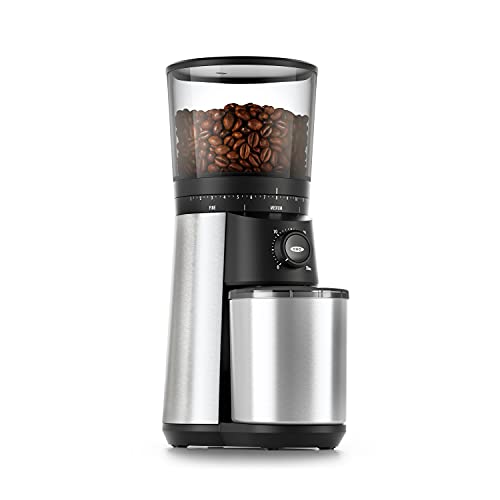
If your oxo conical burr grinder is producing uneven grounds, the usual culprits are burrs that need cleaning or realignment, a grind setting that doesn’t match your brew method, beans that are too oily or too fresh, static buildup, or grounds left over from the last batch. Most of these are fixable in a few minutes without any special tools.
Why Uneven Grounds Matter in Your Cup
Coffee extracts unevenly when particles vary widely in size. Fine particles over-extract and turn bitter, while coarse particles under-extract and taste sour or thin. When you see a mix of powder and boulders in your grounds, the cup will usually taste flat or harsh no matter how carefully you pour. A consistent grind is the foundation of every other variable in brewing, so it’s worth tracking down the cause before changing your recipe.
The Factors Behind Inconsistent Grinding
Conical burr grinders work by pulling beans between a fixed outer burr and a rotating inner cone. The geometry is forgiving, but it still depends on a few things staying in order. Owners often report that the grind looks fine at first and then drifts after a few weeks, which points to gradual changes rather than a single failure. The main factors are:
- Burr condition: Oils and fine dust accumulate on the burr surfaces over time, which changes how the beans are cut.
- Burr alignment: If the inner cone shifts slightly off center, one side of the grind path opens wider than the other.
- Bean characteristics: Very dark, oily roasts clump and smear, while very fresh beans release CO2 that causes spitting and uneven flow.
- Static: Dry air and low-humidity kitchens cause grounds to cling to the chute and bin, so the output looks inconsistent.
- Retention: Old grounds trapped in the grinding chamber mix with fresh ones and create a mismatched batch.
- Setting mismatch: A grind size that suits a French press will produce erratic results in a pour-over, and vice versa.
How to Fix Uneven Grounds
Start with the simplest checks and work toward the more involved ones. Changing the grind setting or switching to a different roast will sometimes solve the problem immediately, but if the issue persists, cleaning and inspection are the next steps. We also found Best Burr Coffee Grinders for Home: 6 Electric Grinders Compared useful on this point.
Clean the Burrs and Grind Path
Remove the hopper, bean chute, and burr assembly according to the manual your grinder came with. Brush away loose grounds and coffee oil residue. Many owners use a small brush and, for stubborn oil, a dry cleaning tablet made for grinders. Avoid water on the burrs unless the manufacturer specifically allows it, because moisture can cause rust or swelling.
Check Burr Alignment
If cleaning doesn’t help, look at whether the inner cone sits centered. Consult the manufacturer’s instructions for the exact adjustment procedure, since the process varies by model. A slightly off-center cone is one of the most common reasons for a grind that looks uneven across a single batch.
Purge Retained Grounds
Before switching between coffees or grind sizes, run a small amount of beans through the grinder and discard them. This clears the old grounds and stabilizes the next batch. Owners who roast or buy in varied batches often build this step into their routine.
Manage Static and Bean Choice
For static, a light tap on the grinder body or a damp paper towel wiped around the chute can reduce clinging. For oily dark roasts, consider switching to a medium roast for a few days to see whether the grind evens out. Very fresh beans, roughly a few days off roast, may need a short rest before grinding for steadier output.
Practical Tips for Consistent Grounds
- Clean the burrs and chute every one to two weeks, more often if you use oily beans.
- Purge a small amount of beans after changing coffees or grind settings.
- Keep the hopper reasonably full, since a nearly empty hopper can feed beans unevenly.
- Grind only the amount you need, and store beans in an airtight container away from heat.
- Record your grind setting for each brew method so you can return to a known starting point.
What We’d Use
If you want a dependable companion for keeping your grinder clean and your grounds consistent, these items are commonly recommended by home brewers:
- A soft grinder brush for clearing burr and chute residue: View on Amazon
- Cleaning tablets formulated for coffee grinders to dissolve stubborn oils: View on Amazon
- A grinder-friendly storage canister to keep beans fresh between batches: View on Amazon
If you’re still deciding on a model or want to compare features before troubleshooting further, see Oxo Brew Conical Burr Coffee Grinder: 7 Best Picks (2026) and Flat vs Conical Burr Grinders: What Actually Differs for background on how burr design affects consistency.
Related Questions
How often should I clean my oxo conical burr grinder?
Most owners clean the burrs and chute every one to two weeks with regular use. If you brew with oily dark roasts, cleaning more often helps prevent buildup.
Can I use water to clean the burrs?
Check the manual first. Many manufacturers advise against water on the burrs because moisture can cause rust or damage. Brushing and dry cleaning tablets are the safer default.
Why do my grounds clump in the chute?
Clumping usually comes from oily beans, high humidity, or static. Cleaning the chute, switching roasts, or wiping the area with a slightly damp cloth often resolves it.
Does grind size affect evenness?
Yes. Very fine or very coarse settings can make a grinder look inconsistent, especially with oily beans. Adjusting to the middle of your brew method’s range often produces a steadier output.
Should I see a technician if the problem continues?
If cleaning, purging, and adjustment don’t help, contact the manufacturer’s support team or a qualified repair service, as internal parts may need professional inspection.
Related reading
- OXO Conical Burr Coffee Grinder with Integrated Scale: 7 Best Picks (2026)
- 9 Best Oxo Conical Burr Grinders with Scale Options for Home Brewing (2026)
Ready to choose one?
About Audrey Hayes
Audrey Hayes is part of our editorial team and reviews and edits our coffee gear & accessories guides, checking product details against manufacturer specifications and owner feedback.